The upload never touches a server of ours. Neither does the bill.
Ask for a presigned URL and hand it to the browser. The file goes straight to R2 — not through your worker, not through ours. Past the included 5 GB the extra draws from prepaid credits you loaded on purpose, not an invoice you find out about later.
Storage is beta and we say so on the tin.
presign only
Your object-storage bill is the part you can't predict.
Storage is rarely the only meter. There is one on the bytes you keep, usually one on the requests you make, and on the biggest platforms one on the bytes going out. You can price the first. The other two arrive after the month is already over.
from $23 to $2,657
a $1,300+ bill on an empty bucket
four price tiers to the internet alone
These are reconstructions of publicly reported incidents, not Parsons customers. The 2020 figure is a bill that was published in full; the 2024 one is a request-charge incident widely written up at the time. Neither is a claim about any vendor's current rates — for those, see the comparison further down, which uses published list prices checked August 2026.
An afternoon on IAM, just to accept a photo.
Bucket policy. Signing principal. Access key. Somewhere safe to keep the access key. A plan for rotating the access key. A CORS document. Then the preflight fails and you debug that instead.
The whole of that is one tool call here, and the reason it works in a browser afterwards is the part nobody mentions: a CORS policy is applied to every bucket at creation — GET, PUT and HEAD, with ETag exposed so your uploader can read it back. A missing CORS document is the single most common reason direct-to-store upload fails elsewhere.
- 1create the bucket
- 2write the bucket policy JSON
- 3write the IAM policy for the signing principal
- 4create an access key
- 5put the access key somewhere the server can reach
- 6plan how you will rotate it
- 7write the CORS document
- 8apply it, then debug the preflight
- 9work out whether you also need a CDN in front
→ { id: "bkt_7c3a91",
physicalName: "p-proj_a41f8c2e-avatars" }
✓ CORS applied · GET, PUT, HEAD · ETag exposed
We are not a storage company. That is why you can have a ceiling.
Every storage vendor in the table further down earns its revenue on a meter of one kind or another. That is not a criticism of their pricing pages, which are honest — it is a description of their business. A company whose income is the meter cannot sell you a ceiling, because the ceiling is the income.
the deploy, the email and the scheduler.
Storage is one line item inside a platform subscription. So the honest thing for us to sell is 5 GB inside the $15, and overage you prepaid on purpose — past the allowance, stored bytes draw from credits at $0.025/GB-month, roughly wholesale-plus-half, and nothing is deleted. A hard safety cap sits far above as a fraud stop, with an ask-us-to-raise-it path in the billing console. Well above that we are not your storage provider, and we say so further down this page.
A presigned URL is a deadline and one key.
Not a credential, not a session, not access to your bucket. It is a link that permits exactly one method, against exactly one object path, until exactly one moment — and then it is a 403.
?X-Amz-Algorithm=AWS4-HMAC-SHA256
&X-Amz-Expires=900 ← counting down: 14:59
&X-Amz-SignedHeaders=host ← the whole answer to "what is signed"
&X-Amz-Signature=…
The bytes travel to {accountId}.r2.cloudflarestorage.com directly — not through your worker, and not through ours. We mint the URL and then we are not in the conversation.
What that signature covers — and what it does not.
This page used to claim a size ceiling was baked into the signature. It is not, so the claim is gone. Here is the real split, and you should hold the rest of this page to the same standard.
Your AI, your backend, or no HTTP at all.
The same objects, the same listing, the same quota. Pick the door that matches where the bytes already are.
→ { url: "https://…&X-Amz-Expires=900", expiresAt: "2026-08-22T14:17:11Z" }
The project is the connection's pinned project — never a tool argument, so it cannot be passed wrong. Each call re-checks that you still own that project. And because MCP tool calls are uncapped and never billed, driving Storage from your assistant costs nothing per call.
Authorization: Bearer sk_live_…
{ "bucket": "bkt_7c3a91", "key": "u/91/photo.jpg", "expiresSec": 900 }
For a backend that does not speak MCP. Presign uploads and downloads, list objects, delete an object. The project is resolved from the key, so there is no project id to get wrong in a request body. Rate limits are stated rather than discovered: 120 burst, 1,200 requests per minute per project. This is a real credential and we would rather name it than pretend we have none.
await env.FILES.get(key)
env.PARSONS_BUCKET_ID // "bkt_7c3a91"
Deploy an app with an R2 bucket provisioned and it arrives bound as env.FILES, with its id in env.PARSONS_BUCKET_ID. No round trip, no access key, nothing to rotate. One edge worth knowing before it bites you: writes through the binding need a known length, so piping a request body through a transform of your own fails at runtime — and not in local testing. Declare the length up front.
Listing, quota and metering see all three. They are not three systems with a sync problem — they are three doors into the same bucket.
The bucket shows up already wired to the app.
Deploy an app with storage provisioned and four things happen in one step: the bucket is created, bound as env.FILES, its id injected as env.PARSONS_BUCKET_ID, and registered into Storage so it appears in list_buckets and in the console alongside the ones you made by hand.
Then the part that matters more: deleting the app releases the binding and keeps the data. And a bucket that is a live app's env.FILES cannot be deleted at all — delete_bucket refuses outright, which is a stronger guard than the must-be-empty rule.
Refusals you can actually read.
For anyone driving storage from an agent, the error message is the product. A round trip through an AI costs real time, so a refusal that does not tell you the fix costs you twice. Pick a bad input and see what comes back.
Key sanitisation is a rejection, not a silent rewrite: no .., no leading slash, no backslash, no C0 or C1 control characters, 1,024 characters at the outside. A traversal is impossible earlier rather than cleaned up later — and you are told which rule you hit. The fourth chip is the one worth clicking: pass a bucket name where an id is required and the refusal names the correct bkt_ id and tells you to re-send.
A failed card stops you spending. Not reading.
When a subscription lapses, three calls refuse and three deliberately keep working. Your files do not become hostages while you update a card.
There is no admin UI to learn, because the tool list is the interface.
Storage's write path is eleven MCP tools. Make a bucket, hand out a 24-hour upload link, page a prefix, clear out the test files — from the assistant you already have open. There is a console further down this page, and it is read-only on purpose: nothing you do here has to be done there. MCP servers are table stakes by now; what is not table stakes is that this is the interface rather than a companion to one.
Docs once: /docs, /docs/quickstart.md and /docs/api.md serve markdown that is byte-identical to what the docs tool returns. What your AI reads and what you read cannot drift.
→ { id: "bkt_2f81aa", physicalName: "p-proj_a41f8c2e-invoices" }
storage__presign_upload { bucket: "bkt_2f81aa", key: "2026-08/inv.pdf", expiresSec: 86400 }
→ { url: "https://…&X-Amz-Expires=86400", expiresAt: "2026-08-23T14:02:11Z" }
→ ✕ refused · "avatars" is a bucket NAME, not a bucket id. Re-send with bucket: "bkt_7c3a91".
storage__list_objects { bucket: "bkt_7c3a91" }
→ { objects: [ …100 keys ], truncated: true, nextCursor: "…" }
The bucket list you went looking for.
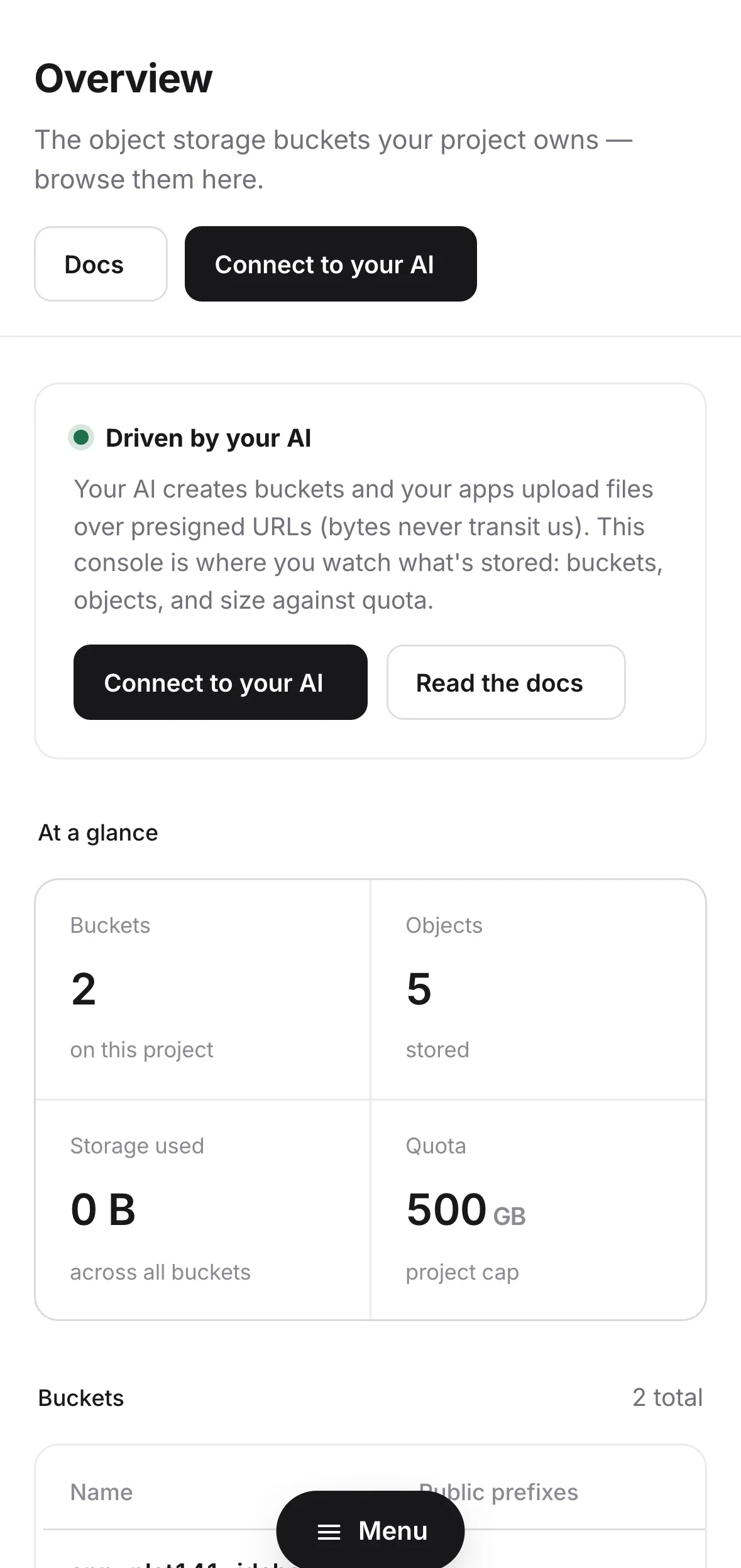
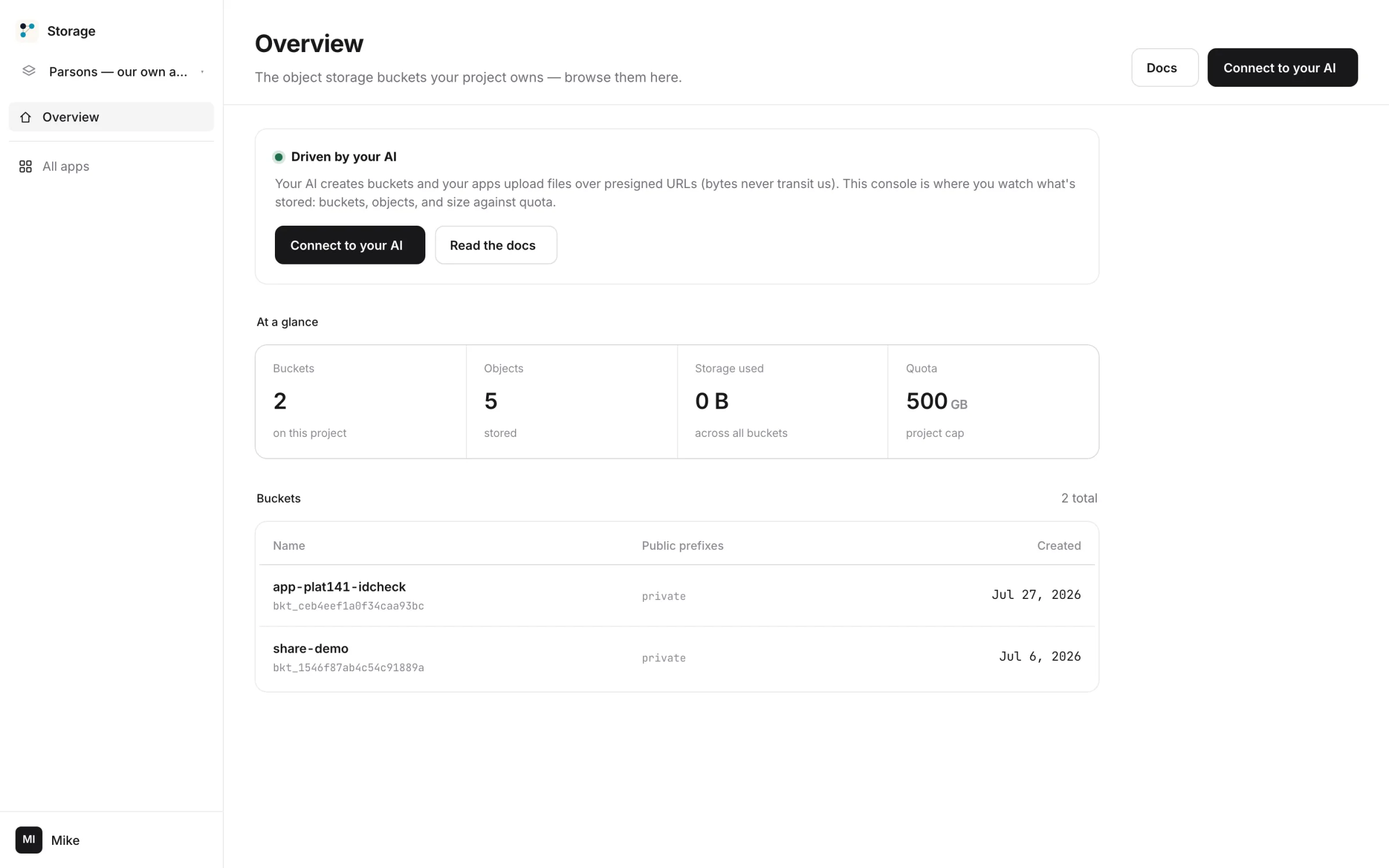
A recurring complaint about raw object stores is that people cannot see what is in them. Here is the console — the real column names, the real quota tile, and an inline gallery of every image you have stored.
| name | physicalName | objectCount | sizeBytes | boundAppId | createdAt |
|---|---|---|---|---|---|
| avatars | p-proj_a41f8c2e-avatars | 412 | 1,204,882,431 | — | 2026-06-02 |
| uploads | p-proj_a41f8c2e-uploads | 1,204 | 2,776,410,090 | app_7d1c | 2026-07-14 |
| invoices | p-proj_a41f8c2e-invoices | 38 | 142,900,112 | — | 2026-08-22 |
Where we lose, printed rather than omitted.
You have already read four comparison tables today and all four were won by the vendor who drew them. Here are the rows where we lose, kept in.
| Parsons Storage | Cloudflare R2 | Backblaze B2 | UploadThing | |
|---|---|---|---|---|
| What 10 GB costs you | $15/mo + $0.13 of prepaid credits — not sold on its own | free at 10 GB, then $0.015/GB-month | free at 10 GB, then $6.95/TB-month | 2 GB free · $10/mo buys 100 GB |
| Above your allowance | prepaid credits · $0.025/GB-month, hard safety cap far above | bills you · no ceiling | bills you · no ceiling | $0.08/GB over included, on the usage-based plan |
| Egress | not a line item | free | free up to 3× what you store, then $0.01/GB | included in the plan · unlimited downloads |
| Per-operation charges | counted, never billed | $4.50/M class A · $0.36/M class B, above a free allowance | class A, B and C calls free | none published |
| Petabyte scale | no | yes | yes | yes |
| S3-compatible API | no | yes | yes | no |
| Hosted public file serving | no — your worker serves | yes | yes | yes |
| Image transforms & CDN | no | via Cloudflare | — | yes |
| Lifecycle rules & storage classes | no | yes | yes | — |
| Bound natively into your deployed app | yes · env.FILES | yes, on Workers | no | no |
| Readable while your card is past due | yes | — | — | — |
| Also buys auth, database, deploy, email, scheduler | yes | no | no | no |
Competitor rows are published list prices and capabilities taken from each vendor’s own pricing page, checked August 2026: developers.cloudflare.com/r2/pricing, backblaze.com/cloud-storage/pricing, uploadthing.com/pricing. Where a vendor does not publish the answer we say so, or leave a dash, rather than filling it in.
Unlimited projects. No extra cost.
A project is a hard wall: its own buckets, its own members, its own spend cap, its own MCP connection. One for the business, one for the client, one for the thing you are only half serious about. The price does not move.
members 1
members 4
members 2
members 1
Not per project. Not per seat.
One plan. It covers everything.
Storage is not sold on its own. The subscription is the account, and the account is every Parsons product across unlimited projects. Going past an included allowance simply draws from prepaid credits at roughly wholesale-plus-half — the bill starts when real usage does.
- 5 GB of objects — account-wide, not per project
- 10,000 objects per project — a flat anti-abuse bound
- Egress not billed — serving what you store is not a line item
- Class A and Class B operations counted, never billed
- Presigned upload and download, 900s default, 7 days maximum
- Buckets bound into deployed apps as env.FILES
- Every other Parsons product, one login
14-day free trial on your first subscription · monthly or yearly, chosen at checkout · cancel any time.
Yearly is the same account for two months less: $150 instead of $180.
Nothing here is free beyond the trial: no tier below Base, no per-seat line, no enterprise tier. The trial does take a card — we would rather charge you $15 than bait you onto a meter.
The awkward ones, answered flatly.
Do my files pass through your servers?
Can the presigned URL be used to upload something enormous?
What happens when I hit 5 GB?
Can you serve my files publicly?
Is there an S3-compatible API?
What if my card fails?
What if I delete my account — do the files actually go?
Does driving it from Claude or ChatGPT cost extra?
How many projects can I make?
Is this really beta?
Image resizing, thumbnails, lifecycle rules, content moderation?
Hand over a link. Not your bucket.
One call gets a URL that can do exactly one thing, for fifteen minutes, and nothing else ever — and the month it happens in still costs $15.